Understanding HTML Tags and Elements
Every stunning website you have ever visited is constructed from the same basic building blocks: HTML.
What is HTML and Why Use It?
Think of HTML as the blueprint of a house. It defines where the walls go, where the doors are placed, and where the windows sit. It doesn't handle the paint colors or the furniture (that’s CSS), but without it, there’s nothing to decorate. We use HTML to give structure to our content so that web browsers know how to display text, images, and links.
The HTML Tag
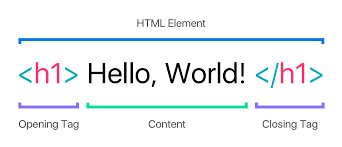
A tag is like a instructional label. It tells the browser, "This is the start of a paragraph" or "This is the end of a heading."
Opening Tag:
<p>Closing Tag:
</p>
Every tag is different and their working display properties are different
The HTML Element
The element is the "whole package." It includes the opening tag, the content inside, and the closing tag.
Self-Closing (Void) Elements
Not every element needs a closing tag. Some are "loners" because they don't wrap around any text content. These are called Void Elements.
<img>: For images.<br>: For a line break.<hr>: For a horizontal rule.
Block-Level vs. Inline Elements
This is where layout begins. Understanding the "social behavior" of your elements is crucial for CSS later on.
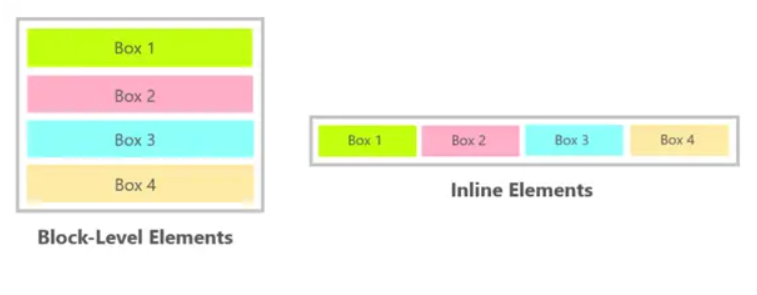
| Feature | Block-Level | Inline |
| Space | Takes up the full width available. | Takes up only as much width as needed. |
| New Line | Always starts on a new line. | Stays on the same line as surrounding content. |
| Examples | <div>, <h1>, <p>, <ul> | <span>, <a>, <strong>, <img> |
Commonly Used HTML Tags
<h1>to<h6>: Headings (1 is the most important).<p>: Paragraphs of text.<a>: Anchors (links).<div>: A generic container used to group elements (the "workhorse" of layout).<span>: A generic inline container for styling specific bits of text.