Network Simplified
Have you ever wondered what happens under the hood when you make a network request? Today, we’ll meet the network devices that handle our traffic. We will explore how data moves from your physical hardware to the remote address.
There is a lot of hardware involved when any device needs to communicate with the public network (internet), such as a modem, router, switch, and firewall. All of these are very important and perform their functions in a sophisticated manner. Each piece of hardware is crucial, and if any part fails, it can have serious consequences for the network. We will progress and understand each hardware and its application briefly.
To understand better, first we need to understand OSI.
Open System Interconnection(OSI) :
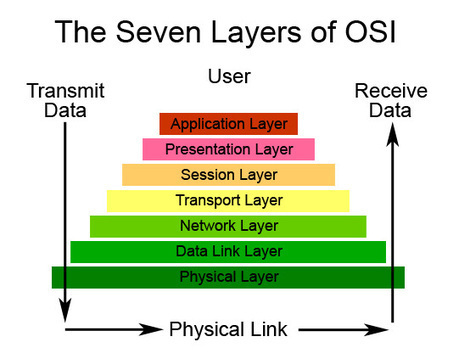
7 Layers at a Glance:
Physical Layer:
This is where the actual physical cables, modems, or hubs lie.
Data Link Layer:
This is where switches come into play.
Network Layer:
This is where the routers are important.
Transport Layer:
TCP and UDP protocols are placed in this layer. All internet traffic is mainly governed by these two protocols.
Session Layer:
Manages conversations and connections between hardware.
Presentation Layer:
All the security-related protocols work here, like encryption and decryption, converting everything to a readable format.
Application Layer:
This is where all the application developers deal with HTTP, the riding horse of the internet, which comes into the picture here.
Modem (The Translator):
As the name suggests, this hardware's only application is to modulate and demodulate the digital signal to an analog signal. In the modern era, all hardware is digital and understands only 0 and 1, while in networks, data travels in the form of light in Optical Fiber, which is analog. To convert this analog to digital and vice versa, most modern modems use QAM, which stands for Quadrature Amplitude Modulation.
Mostly, modems lie at the edge of the network, even beyond the gateway, so they can catch the analog signal, convert it to a machine-understandable format, and pass it to the router. Similarly, if we want to transmit, the router gives the data packet to the modem, which changes it to analog and then transmits it to the network.
Router (The GPS of Network) :
In the above example, if the modem is the translator, think of the router as the traffic police that controls traffic by sending data packets to the internet via the best path. The router deals with IP addresses and, as the name suggests, routes the signal in the best possible way. The router can connect to networks and route traffic through a routing table.
Switch (The Courier Boy) :
Your hardware has 2 identities: one is the IP address, which is temporary and managed by the DHCP server, and the other is the physical MAC address, which is permanent and cannot change. The switch is used to identify the MAC address. The switch doesn’t know the IP address; it collects the data packets from the router and delivers them to the hardware for which the data packet is intended. To map the IP address and MAC address, ARP (Address Resolution Protocol) is used.
Hub (The Dumb Guy):
Unlike routers and switches, the hub does not deal with IP or even MAC addresses. It simply broadcasts data to all the hardware connected to the network, even if it is meant for only one particular device. This creates unnecessary traffic, causing congestion and ultimately wasting resources.
Firewall (The Defender):
Most essential and most misunderstood hardware because it deals with security. Most people think that a firewall is always a software implementation, but the fact is that it could be both software and hardware. In fact, hardware implementation is more sophisticated than software because the OS in hardware is designed specifically for security purposes. It identifies malicious program signatures or patterns and drops the packet. In modern firewalls, even if it is unable to identify the signature, it monitors if any OS-level configuration is changed or if any data leak is occurring. If yes, the firewall blocks that IP from communication.
Load Balancer (The Distributor):
Think of bank having 3 teller counter if there is no control there might be the case that 10 people standing on teller 1 counter rest 2 teller counter having no people in the queue and all the traffic is loaded to teller1 this could also happen with the server. There are smart algorithms made to balance out the traffic reaching to the server. there are few way it handles the traffic.
Round Robin : all clients is been shifted to round robin means the server A is allotted to first client then server B to second when all the server get allocation it will start once again from server A.
Least Connection : it check which server has least traffic and load is diverted to that servers.
IP Hashing: It uses an IP allocation technique where a server is allocated by hashing the IP to a particular server. So, even in the future, if that IP address communicates, it will communicate with that server only.
All devices working in sync:
The Modem (Convert): The request arrives from the outside world as a signal. The Modem translates it into digital data your network can read.
The Firewall (Screen): Before the data moves an inch further, the Firewall inspects it. If it looks like a threat, it’s blocked; if it’s safe, it’s allowed in.
The Router (Direction): The Router looks at the destination IP and points the data toward the correct IP address.
The Load Balancer (Distribute): To prevent any single server from crashing, the Load Balancer picks the best available server to handle the work.
The Switch (Deliver): The Switch identifies the specific physical hardware (MAC address) of that server and delivers the data to its doorstep.
Switch Vs Hub :
| Feature | HUB | SWITCH |
| Intelligence | Dumb (dose not have MAC or IP address) | works on MAC address |
| Data | Data is broadcast among all the member or the network | Particular data is communicated only with the target member of the network |
| Security | Due to broadcast data is exposed to every one | Data is secured not shared with other member |
| Efficiency | Extremely Low due to high traffic and congestion | Extremely high due to private connection to recipient |
Network devices like modems, routers, and switches help data travel smoothly and securely across the internet. Each device has a special job, ensuring our online activities run without a hitch.